Most ecommerce category page SEO guides tell you how to optimize the category pages you already have. Better H1s, tighter meta descriptions, a few hundred words of intro copy... That work matters. But it's not where the biggest organic revenue gains are hiding.
The bigger opportunity is the category pages you haven't built yet.
This guide covers how to identify PLP gaps, validate them against real search demand, and create new categories that satisfy search intent & increase organic revenue.
Key takeaways:
- The biggest SEO opportunity isn't optimizing existing category pages. Rather, it's building missing ones.
- A PLP gap exists when products satisfy search demand, but no dedicated page captures it.
- Find gaps by auditing your catalog, then validating each grouping with keyword research.
- Build a new PLP when there's proven demand, and you have 6+ SKUs.
- A new PLP only works if merchandising and dev teams align before launch.
What is a PLP Gap (and Why Your Catalog Is Full of Them)?
A PLP gap is a transactional keyword cluster with search demand that your site has no dedicated page to capture.
It's different from a keyword gap in general content strategy. A PLP gap is rooted in your product catalog. It exists when you carry products that satisfy a search query, but you've never organized those products into a purposeful, indexed category page.
A concrete example: An outdoor gear retailer has dozens of waterproof hiking boots for women in their catalog. They have a "Women's Hiking" PLP. They have a "Boots" PLP. But they have no "Women's Waterproof Hiking Boots" PLP, despite that phrase generating consistent transactional search volume. Shoppers searching that term land on a generic category page or get lost in filters.
The products exist. The demand exists. The page doesn't.

This is distinct from faceted navigation. Filters create URL variants for sorting and narrowing results, but they aren't purposeful, optimized PLPs. They lack editorial intent, targeted copy, and the internal link equity that comes from being a real node in your site's architecture.
How to Find PLP Gaps in Your Ecommerce Catalog
This is a three-step process. It starts with your catalog, not your keyword tool.
Step 1: Audit Your Catalog for Product Grouping Patterns
Open your product catalog and look for natural groupings you haven't merchandised into standalone pages. Think by:
- Attribute: material, color, size range, technical specification (waterproof, wireless, organic)
- Use case: "for running," "for travel," "for beginners"
- Audience segment: women's, kids', professional-grade
- Modifier combinations: where two existing categories intersect meaningfully
The goal is a list of candidate groupings: product subsets substantial enough to fill a page and distinct enough to reflect a specific shopping intent.
Step 2: Map Product Groupings to Transactional Search Intent
A catalog grouping only becomes a PLP opportunity when real search demand backs it up. Take each candidate grouping and run it through keyword research to answer one question: Are people actually searching for this?
Look for keyword clusters with clear transactional intent. These are queries that include product-type language, modifiers, and buying signals.
- Transactional: "Women's waterproof hiking boots" → PLP gap opportunity
- Informational: "Are hiking boots waterproof" → blog article opportunity
Also, check that the keyword matches the inventory depth you can put behind the page. A PLP with three products isn't a great shopping experience. We typically recommend a minimum of 6 SKUs to justify creating a new category page.
Step 3: Prioritize by Volume, Competition, and Catalog Depth
Not every PLP gap is worth building. Score each candidate on three criteria:
- Product-intent match: Do you have products that truly satisfy the search intent? You don't want to risk positioning your products in a way that is disingenuous or an outright misrepresentation.
- Search volume: Is there enough demand to justify the build? For niche products, even 200–500 monthly searches can be high-ROI at the right conversion rate.
- Catalog depth: Do you have enough SKUs to make a satisfying, shoppable page? Six to eight products is a reasonable floor.
Build the ones that score well on all three first.
Building and Merchandising New PLPs for SEO
Once you've identified and prioritized your gaps, building the page is a cross-functional effort. Here's what that looks like in practice.
URL Structure and Site Hierarchy
New PLPs should sit logically within your existing category architecture. A subcategory page for "Women's Waterproof Hiking Boots" lives under its parent category:
/shop/womens/hiking-boots/waterproof/or, depending on your site structure:
/shop/hiking/boots/womens-waterproof/The right choice depends on your existing URL architecture and how the page relates to parent and sibling categories. Consistency matters. A new PLP should follow the same depth and naming conventions as your existing ones. For crawl budget implications of adding new pages at scale, see Uproer's crawl budget optimization guide.
Merchandising Products Into the New PLP
This is the operational step most SEO guides skip entirely.
Creating the page is a technical task. Filling it with the right products requires coordination with your merchandising or product team. That might mean a product attribute in your PIM, a manual collection rule in Shopify, or a custom category assignment in Magento or Salesforce Commerce Cloud. The mechanism varies. The dependency doesn't.
Get alignment with the merchandising team before the page goes live. A PLP that launches with three products or the wrong products does more harm than good.
On-Page Optimization for a New PLP
Once the page structure and product set are in place:
- H1: Include the primary keyword phrase; match search intent directly
- Meta title and description: Lead with the keyword; the description should give a reason to click
- Intro copy: 50–100 words max; answer the searcher's intent immediately, then let the products do the work
- Internal links: Link to and from the parent category, sibling PLPs, and relevant blog content
- Indexing: Confirm the page is crawlable, not blocked in robots.txt, and submitted via sitemap; see Uproer's ecommerce indexing issues guide for common problems
For a complete on-page optimization checklist, see our ecommerce category page optimization guide.
PLP Gaps vs. Filters: When to Build a Page vs. Add a Facet
This is the question most teams get wrong, and no standard SEO guide answers it clearly.
| Factor | Build a New PLP | Use a Filter / Facet |
|---|---|---|
| Search demand | Consistent monthly volume | Fragmented or negligible |
| Product grouping | Permanent, well-defined subset | Transient or highly variable |
| Catalog depth | 6+ relevant SKUs | Fewer than 6 SKUs |
| Buying intent alignment | Strong: grouping reflects how buyers search | Weak: grouping is internal, not search-driven |
| Cross-link value | High: deserves a place in site nav | Low: primarily a UX sorting tool |
The cleaner heuristic: if a real buyer would type that phrase into Google with the intent to purchase, and you have the catalog depth to satisfy them, build the page. If the grouping is primarily a browsing convenience, use a filter.
Faceted navigation creates indexable URLs in many configurations, but those URLs aren't PLPs. They lack targeted copy, editorial intent, and link equity. Relying on facets to capture PLP-level search intent is one of the most common missed opportunities in ecommerce SEO.
A Real-World Example: How PLP Gap Analysis Drives Organic Revenue
Thread Logic came to Uproer with a problem that's more common than most ecommerce teams admit: a deep product catalog and almost no organic visibility for the specific terms their buyers were actually searching.
Their existing category pages were too broad to capture transactional intent. Shoppers searching for specific product types were landing on generic pages, or not finding Thread Logic at all.
Uproer ran a catalog-level audit: mapped Thread Logic's SKUs against transactional keyword clusters, identified the product groupings with real search demand and no dedicated page, and built out the missing PLPs. Each new page was merchandised with the right products and integrated into the site's architecture with internal links from parent and sibling categories.
Organic revenue grew 1,065%.
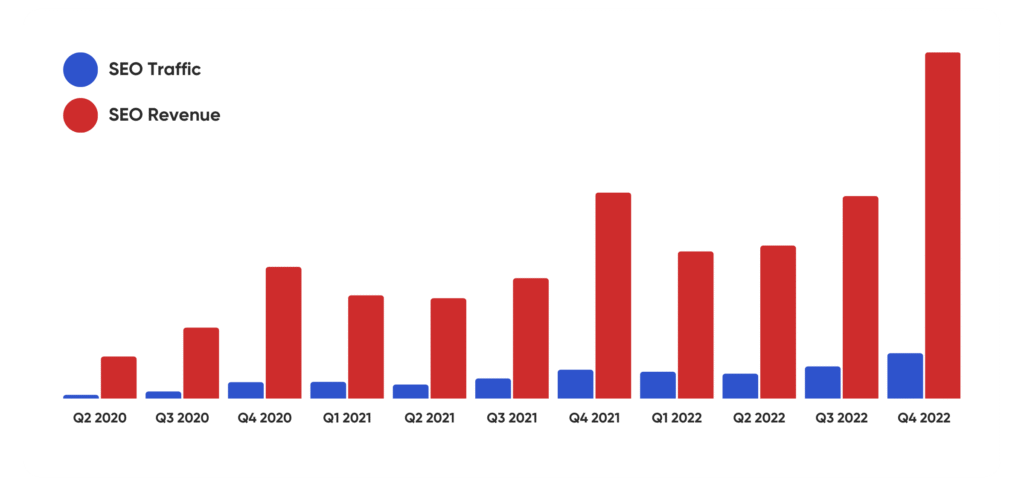
That's not what happens when you rewrite H1s. That's what happens when you build the pages that should have existed in the first place.
Work with an Agency that Knows Scalable Ecommerce SEO
If identifying and building PLP gaps sounds like the right next move for your ecommerce site, Uproer's ecommerce SEO team has done this work for brands at scale, from catalog audits to implementation across Shopify, Magento, BigCommerce, and Salesforce Commerce Cloud. See how we work with ecommerce brands →
Frequently Asked Questions About Ecommerce Category Page SEO
What is the difference between a CLP and a PLP in ecommerce?
A Category Landing Page (CLP) is a broad, top-level category like "Women's Shoes" or "Outdoor Gear." A Product Listing Page (PLP) is a more targeted subcategory, like "Women's Waterproof Hiking Boots," that surfaces a specific set of products for a specific search intent. PLPs are where most ecommerce organic revenue gets made, because they match purchase-intent queries far more precisely than CLPs do.
How do you find missing category pages for SEO?
Start with your product catalog, not your keyword tool. Look for natural product groupings by attribute, use case, or audience that don't have a dedicated indexed page. Then validate each one with keyword research to confirm real transactional demand exists. Where catalog depth meets search demand, you have a PLP gap worth building.
How many products do you need to justify a new category page?
Eight to twelve SKUs is a reasonable floor. Below that, you risk a thin page experience that hurts conversion and sends weak engagement signals to search engines. If a grouping has strong search demand but shallow inventory today, it may still be worth building, especially if you're planning to expand that product line.
Should I use filters or create a new subcategory page?
Build a new PLP when the product grouping reflects real, consistent search demand and you have the inventory to back it up. Use a filter when the grouping is a browsing convenience and the demand is fragmented. Filters are useful UX tools. They're not a substitute for a page built with a specific searcher in mind.
How long does it take for a new category page to rank?
On established domains with strong internal linking, 60–90 days is a reasonable window for early movement. In more competitive verticals, budget 4–6 months. The single biggest lever you control is internal link equity from high-authority parent categories. The faster you build those links, the faster the page gets indexed and evaluated.